How To Install Compiz Fusion Desktop Effects In Ubuntu
Want to impress your friends with cool desktop effects and eye candy in Ubuntu ???
First check out these super cool videos!!!!!!
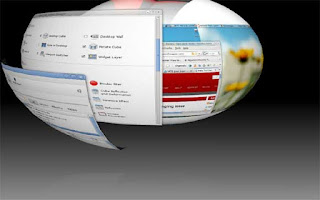


Compiz Fusion is the great project which have brought fame to Linux with its awesome eye-candies .So lets first install the latest version of compiz fusion.
NOTE:If u have graphics card,first u must Install driver for the card before installing compiz.To how to install driver in a easy way click here:
In Ubuntu terminal type:
gksu gedit /etc/apt/sources.list
Add this line to the end of file
deb http://ppa.launchpad.net/compiz/ubuntu karmic main
Now save and close the file.
In Ubuntu type:
sudo apt-get update
sudo apt-get upgrade
To install compiz fusion type in Ubuntu terminal:
sudo apt-get install compizconfig-settings-manager compiz-fusion-plugins-extra compiz-fusion-plugins-main compiz-plugins emerald
Right Click on the "workspace switcher" on the bottom right corner of desktop near trash.Make column =4.
Take Compiz Setting Manager System->Preferences->CompizConfig Settings Manager.Tick Desktop Cube,Cube Rotation,wobbly windows,ring switcher fire effect etc as u prefer.
Now close all applications and logout and login.Right click desktop,then visual effects,Now click extra effects. Again take Compiz Setting Manager System->Preferences->CompizConfig Settings.Scroll down to Cube Reflection and Deformation. Activate it. Click on it to go to its configuration page.Press Ctrl + Alt + mouse left button to rotate desktop.
If u want Cylinder or Sphere
Under the Deformation tab, select Cylinder or Sphere in the Deformation dropdown box. Now you will get desktop rotation to cylinder or sphere mode.Then close.
To use ring switcher.Press windows key+Tab.
USEFUL KEYBOARD COMBINATIONS:
SUPER+SHIFT+DRAG LEFT MOUSE = draw fire
SUPER+SHIFT+C = clear fire
CTRL+ALT+DRAG LEFT MOUSE = rotate cube
CTRL+ALT+LEFT ARROW = rotate cube
CTRL+ALT+DOWN ARROW = flat desktop
SHIFT+ALT+UP = initiate window picker
CTRL+ALT+DOWN = unfold cube
ALT+TAB = window switch
SUPER+TAB = flip switcher or ring switcher, depending on which is enabled.
ALT+F7 = initiate 'move windows'
SHIFT+F9 = water effect
SHIFT+F10 = slow animations
CTRL+ALT+D = show desktop
For Grouping and Tabbing:
SUPER+S = select single window
SUPER+T = tab group
SUPER+Left = change left tab
SUPER+Right = change right tab
SUPER+G = group windows
SUPER+U = ungroup windows
SUPER+R = remove group window
SUPER+C = close group
SUPER+X = ignore group
Hold the SUPER button then select the windows you want to group and then hit SUPER+G.
The SUPER key is the Windows key on most keyboards.
First check out these super cool videos!!!!!!


Compiz Fusion is the great project which have brought fame to Linux with its awesome eye-candies .So lets first install the latest version of compiz fusion.
NOTE:If u have graphics card,first u must Install driver for the card before installing compiz.To how to install driver in a easy way click here:
In Ubuntu terminal type:
gksu gedit /etc/apt/sources.list
Add this line to the end of file
deb http://ppa.launchpad.net/compiz/ubuntu karmic main
Now save and close the file.
In Ubuntu type:
sudo apt-get update
sudo apt-get upgrade
To install compiz fusion type in Ubuntu terminal:
sudo apt-get install compizconfig-settings-manager compiz-fusion-plugins-extra compiz-fusion-plugins-main compiz-plugins emerald
Right Click on the "workspace switcher" on the bottom right corner of desktop near trash.Make column =4.
Take Compiz Setting Manager System->Preferences->CompizConfig Settings Manager.Tick Desktop Cube,Cube Rotation,wobbly windows,ring switcher fire effect etc as u prefer.
Now close all applications and logout and login.Right click desktop,then visual effects,Now click extra effects.
 Again take Compiz Setting Manager System->Preferences->CompizConfig Settings.Scroll down to Cube Reflection and Deformation. Activate it. Click on it to go to its configuration page.Press Ctrl + Alt + mouse left button to rotate desktop.
If u want Cylinder or Sphere
Under the Deformation tab, select Cylinder or Sphere in the Deformation dropdown box. Now you will get desktop rotation to cylinder or sphere mode.Then close.
To use ring switcher.Press windows key+Tab.
USEFUL KEYBOARD COMBINATIONS:
SUPER+SHIFT+DRAG LEFT MOUSE = draw fire
SUPER+SHIFT+C = clear fire
CTRL+ALT+DRAG LEFT MOUSE = rotate cube
CTRL+ALT+LEFT ARROW = rotate cube
CTRL+ALT+DOWN ARROW = flat desktop
SHIFT+ALT+UP = initiate window picker
CTRL+ALT+DOWN = unfold cube
ALT+TAB = window switch
SUPER+TAB = flip switcher or ring switcher, depending on which is enabled.
ALT+F7 = initiate 'move windows'
SHIFT+F9 = water effect
SHIFT+F10 = slow animations
CTRL+ALT+D = show desktop
For Grouping and Tabbing:
SUPER+S = select single window
SUPER+T = tab group
SUPER+Left = change left tab
SUPER+Right = change right tab
SUPER+G = group windows
SUPER+U = ungroup windows
SUPER+R = remove group window
SUPER+C = close group
SUPER+X = ignore group
Hold the SUPER button then select the windows you want to group and then hit SUPER+G.
The SUPER key is the Windows key on most keyboards.


Comments